Free Decoder: Vakaros + Calypso Anemometer.
Convert .vkx APA/APS to TWS/TWD
Align your instruments before recording.
Calypso Ultrasonic Portable Mini Wind Meter – Vakaros
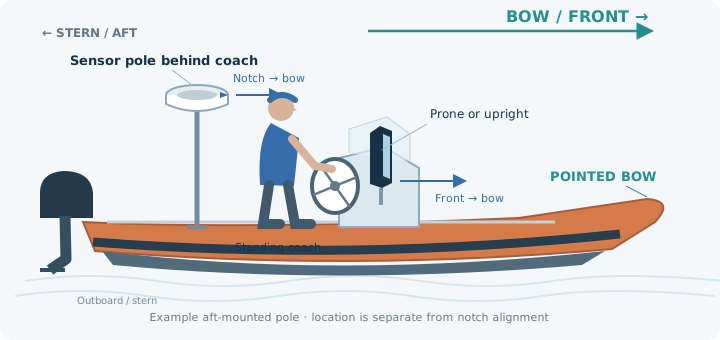
Keep the sensor pole behind the coach, in clear airflow. Keep the instruments as close as practical to one straight line along the boat’s length.
The device can be prone or upright. Ensure its front faces the bow and align the wind sensor’s notch/reference mark in the same direction. Avoid mounting on the side of the helm.
Mounted flat? Configure your Vakaros in Prone mode before recording. Pair your Calypso wind meter and check that apparent wind is being recorded before exporting your VKX.
From apparent wind to true wind.
An anemometer records the wind felt by the moving boat. SailSync combines time-aligned apparent wind angle and speed with GPS motion to calculate eligible ground-referenced true wind speed and direction.
For VKX files, recorded compass orientation locates the sensor readings and recorded GPS velocity accounts for boat movement. This also supports stationary and slow-moving recordings when those inputs are valid. Missing data and gaps remain visible. Already decoded true-wind CSV data is visualized without converting it again. A GPS-only track cannot reveal measured wind.
We do not sell your data to 3rd parties.
Use the supported SailSync API.
Create a SailSync account and an API credential with data:read and sessions:write. Normal account rate limits and import budgets apply. Each file has a hard 50 MB limit.
POST /api/integrations/v1/wind_decodes
Authorization: Bearer YOUR_API_TOKEN
Idempotency-Key: YOUR_UNIQUE_REQUEST_KEY
Content-Type: application/json

{"filename":"session.vkx","byte_size":123456,
 "settings":{"convert_to_true":true,
             "orientation_basis":"recorded_heading",
             "heading_reference":"true_north",
             "vkx_angle_reference":"sensor_relative_clockwise_from"}}
- Request an upload permission. POST all returned form fields and your file directly to the returned S3 URL, with the file last.
- Call
POST /api/integrations/v1/wind_decodes/:id/complete, then pollGET /api/integrations/v1/wind_decodes/:id. - Read results using
GET /api/integrations/v1/wind_uploads/:upload_id?window_seconds=300. Results are JSON; plotting happens in your client.
Default averaging: 300 seconds. Choose 5 seconds, or whole minutes from 60 through 3600 seconds. CSV requests require explicit column mappings, units, timezone and wind reference. VKX apparent-to-true conversion requires explicit reference confirmation. Respect Retry-After on rate limits.